Kafka FAQ
1) Explain kafka architecture ?
-
Feature
- kafka is a sustainable
distributedpub-sub (publish-subscribe) message system - developed by Linkedin via scala
- can work with both online and offline msg. Data saved on disk with replica -> prevent data lost
- kafka is a sustainable
-
Component
Broker- kafka cluster has many nodes
- A broker is a node/server
Topic- every event on kafka belongs to a class, which is “topic”
- each topic for different data source (feeds of messages)
- can have unlimit topics
- producer-subscriber use “topic” as basic unit. Can split further via topic partition
Partition- each topic has multiple partitions
- NOTE : same broker can have multiple partition -> broker count has NO relation to partition count
- each topic has a partition id. Start from 0
- NOTE !!! :
- data in each partition can be ordering. But CAN’T guarantee global data (all data in topic) is ordering
- ordering : keep the same ordering in producer’s data and data read by consumer
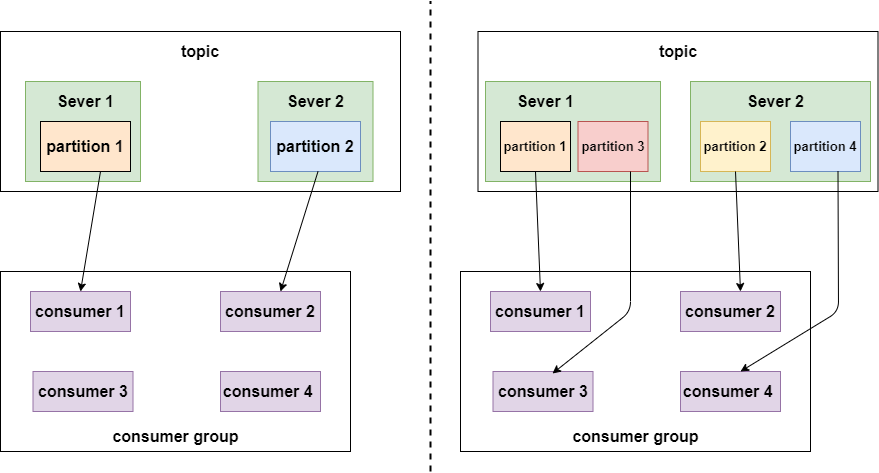
- partition defines the MAX “con-current” consumer in the same consumer group
- So, we can raise consuming speed, if we have more partition
- Partition replicas
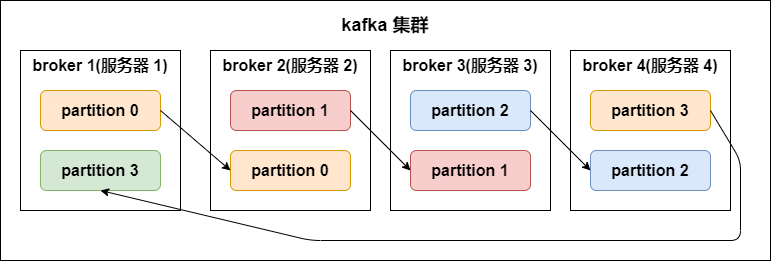
- replication-factor
- define how many replicas (on different brokers).
# of replicas == # of brokerin general- Each
partitionhas its ownleader replicaandfollower replica- e.g. 1 leader, N followers -> N replicas
- the follower replica which is in sync called “in-sync-replicas(ISR)”
- NOTE !!! :
producer and consumerBOTHread and writedata fromleader replica, NOT interact with follower replica - For data reliability when data I/O
- if leader down, then will raise the other follower as new leader
- replication-factor
Segment- each partition has
multiplesegments.- Each segment has 2 parts:
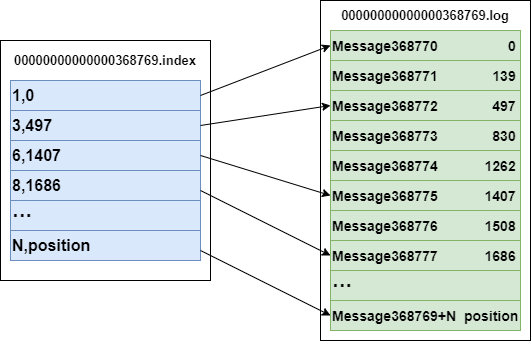
.index: index file (for .log). for finding offset in .log file.log: record actual event data
- Name convention
- consider “global partition”. Start from 0
- Next segment name if last partition’s MAX offset (offset msg count)
- offset is 64 bit Long, 20 digit nunber, filled with 0 if no digit
- Each segment has 2 parts:
- example:
3,497inindex: means 3rd msg in .log file, and its offset = 497Message 368772inlog: means it’s 368772 rd msg in global partition- .log and .index
bash# file structure /<topic_name>-<partition_name> /.../xxx.index /.../xxx.log # index file 00000000000000000000.index // <offset>.index # log content 00000000000000000000.log // <offset>.logbash# example -rw-r--r--. 1 root root 389k 1月 17 18:03 00000000000000000000.index -rw-r--r--. 1 root root 1.0G 1月 17 18:03 00000000000000000000.log -rw-r--r--. 1 root root 10M 1月 17 18:03 00000000000000077894.index -rw-r--r--. 1 root root 127M 1月 17 18:03 00000000000000077894.log
- each partition has
Producer- msg producer, send msg to kafka broker
- write data to
leader replica
Consumer- msg consumer (client), read msg from kafka
- consumer MUST belong to a consumer group
- read data from
leader replica - NOTE !!! :
# of consumershould<=# of partition in topic- since same data should ONLY be consumed by one consumer under same consumer group at once
Consumer group- each consumer belogs to a specific
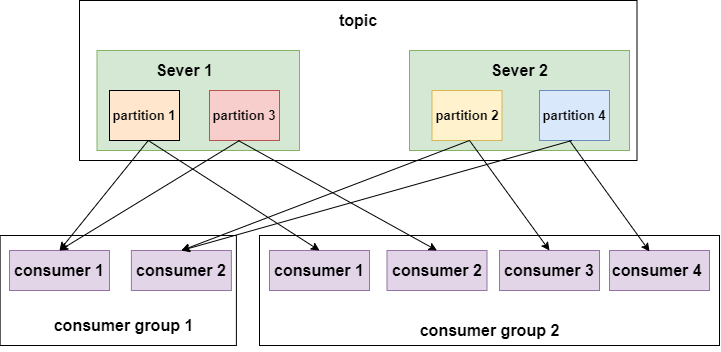
consumer group(we can define consumer’s group name) - SAME consumer in SAME consunmer group ONLY consume same msg ONCE
- each consumer has a ID (group ID). All consumers can subscribe all partition under a topic
- each partition CAN ONLY be consumed by A consumer under a consumer group
- each consumer belogs to a specific
-
Pic
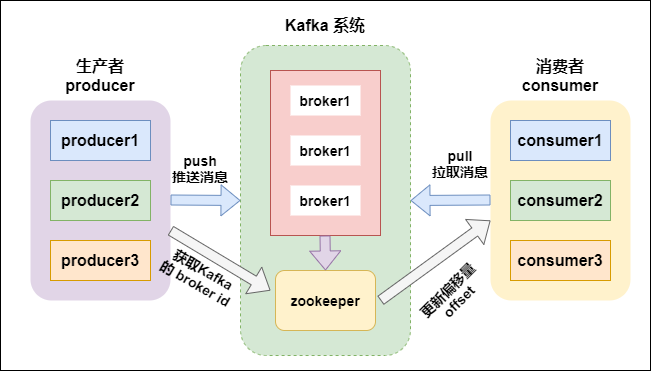
-
Ref
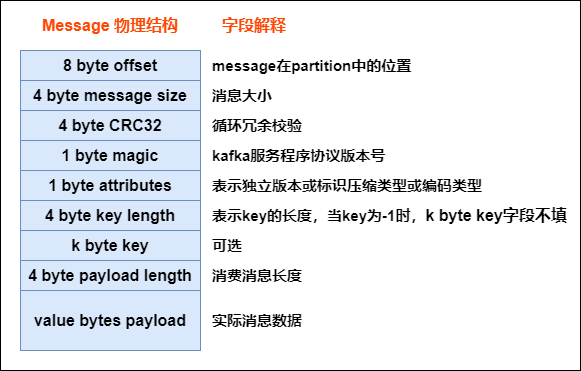
1’) Kafka message structure ?
- As below, every msg sent from producer will be pre-processed via kafka, then saved as below structure (in kafka broker). Only last field is the actual data from broker
- Pic
1’') How kafka find .log file via index ?
- A partition on disk is a series of
segments. Each segment is a set of files named by thebase offsetof its first record:00000000000000368769.log: the records00000000000000368769.index: aSPARSEmap ofrelative offset -> byte positionin the .log00000000000000368769.timeindex:timestamp -> relative offset(used byoffsetsForTimes)
- Lookup of offset
Nis 3 steps, allO(log n)then a short scan:- step 1)
binary search on the file NAMES-> the segment whose base offset is the largest one <= N - step 2)
binary search inside the .index-> the nearest indexed entry <= N, giving a byte position - step 3)
sequential scanfrom that position in the .log until the record with offset N
- step 1)
- Why sparse (one entry per
log.index.interval.bytes, 4KB by default) : a dense index would be as large as the data. Sparse index = small enough to stay in page cache, scan cost bounded by the interval - Reading is then a
sendfile()from page cache to socket (zero copy), which is the other half of why kafka is fast
1’‘’) Explain how does zookeeper (ZK) work in kafka ? how kafka interact with offset via ZK ?
- What ZK held (kafka <= 2.x)
- broker registration + liveness (ephemeral nodes)
controller election(the broker that assigns partition leaders)- topic / partition / replica metadata, config, ACL, quota
- Offsets
kafka 0.8 and before: consumer offsets were committed to ZK -> ZK writes became the bottleneck (ZK is built for low-write coordination, not per-message commits)kafka 0.9+: offsets are committed to an internal compacted topic__consumer_offsets, keyed by<group, topic, partition>. ZK is no longer in the consume path
KRaft(KIP-500, production-ready in 3.3, ZK removed in 4.0) : metadata moves into an internal Raft-replicated log managed by controller brokers- no external ZK to operate, faster failover, and metadata scales to millions of partitions
- Interview one-liner : “ZK coordinated the cluster, never the data path; offsets left ZK in 0.9 and ZK itself left in KRaft”
2) How does kafka implement exactly once ?
- please check below
Idempotence (冪等性),transactional (事務性) - TL;DR
- PID (producer ID), sequence number
- transaction
3) How kafka avoid data missing ?
- Producer
- Via
ACK - Can use
sync,asyncmode send data to kafka - Mode
- Sync
- send a batch data to kafka, wait for kafka’s response
- producer wait 10 sec (?), if no ACK response, mark as failure
- producer retry 3 times (?), if no ACK response, mark as failure
- send a batch data to kafka, wait for kafka’s response
- Async
- send a batch data to kafka, ONLY offer a
callback()method - save data in producer’s buffer first, buffer size is about 20k
- if meat threshold, then can send data (to kafka)
- size of batch data is about 500
- NOTE : if there is no ACK from kafka broker, but producer buffer is full, developer can decide mechanisms whether clean buffer or not (programmatically)
- send a batch data to kafka, ONLY offer a
- Sync
- Via
- Broker
- Via
Partition replicasavoid data missing
- Via
- Consumer
- Each consumer record/maintain its own offset. can avoid data missing
- We can save offset on client’s file system, DB, Redis…
3’) Explain kafka ACK ?
request.required.acks: how to acknowledge when kafka writes producers’ messgage to its (kafka) copy- A tradeoff between efficiency (response speed) and reliability (fault tolerance)
- cases
ack = 1 (default)- when producer -> kafka broker. if kafka leader comfirms msg received successfully -> Success, will lost data if leader down before followers sync
ack = 0- whenever producer -> kafka broker, mark it as success. Highest speed, will lost data if broker down
ack = -1 (or all)- the leader waits for
every replica currently in the ISR— not every follower. Slowest, and it only guarantees durability together withmin.insync.replicas(e.g.replication.factor=3+min.insync.replicas=2), which is what makes the write fail rather than be acknowledged by a single copy when replicas fall out of sync. See 6) and 10).
- the leader waits for
- Ref
4) Explain kafka basic data model ?
Record:key,value,headers,timestamp, and the broker-assignedoffsetTopic: a named, append-only log. A logical stream, split into partitionsPartition: the unit of ordering, storage and parallelism- ordering is guaranteed
WITHIN a partition ONLY, never across a topic - with the default partitioner the partition is
murmur2(serialized key) % partition count, so the same key lands in the same partition — that is how per-entity ordering is achieved. It holds only while the partition count and the partitioner are stable:adding partitions re-maps keys, and a custom partitioner can do anything - a null key ->
stickybatching (fill one partition’s batch, then switch), not strict round-robin
- ordering is guaranteed
Segment: the files a partition is stored as (see 1’')Replica: each partition hasreplication.factorcopies — oneleader(all reads/writes) and followers that fetch from itConsumer group: a set of consumers sharing a subscription. One partition -> at most one consumer in the group, sopartition count is the ceiling on parallelismOffset: a consumer’s position in a partition. Data is NOT deleted on read — it is retained byretention.ms/retention.bytes, or compacted by key (cleanup.policy=compact), which is what makes replay possible
text
topic "orders"
 ├─ partition 0 : [0][1][2][3][4]        ← ordered, immutable, append-only
 ├─ partition 1 : [0][1][2]                 leader on broker A, followers on B,C
 └─ partition 2 : [0][1][2][3]
consumer group "billing" : c1 → p0, c2 → p1+p2   (a 4th consumer would idle)
5) Explain how does kafka save data (low level, file system level) ?
- File
- .log : file save data
- .idnex : file save .log files’ index
6) Explain kafka master, slaves relation ? regarding data partition, … ?
- Kafka has NO cluster-wide master for data. Leadership is
per partition, so load spreads across every brokerleader replica: serves ALL produce and consume traffic for that partitionfollower replica: does nothing but fetch from the leader to stay in sync (it is a hot standby, not a read replica — thoughfollower fetchingfor locality exists since 2.4)
- The
controller(one broker, elected via ZK or KRaft) is the cluster-level coordinator: it detects broker failure and reassigns partition leaders - Failover : if a leader dies, the controller promotes a replica
from the ISRunclean.leader.election.enable=false(default) : refuse to promote an out-of-sync replica -> availability suffers, data does not= true: promote anyway -> stays available, silently loses records
Preferred leader: the first replica in the assignment list; kafka rebalances back to it so leadership stays evenly spread- Durability knobs work together :
replication.factor=3+min.insync.replicas=2+acks=allacks=allwaits forevery replica currently in the ISR— all 3 when the cluster is healthy, 2 once one replica has dropped outmin.insync.replicas=2is thefloor: if the ISR shrinks below 2, the write isrejected(NotEnoughReplicas) instead of being acknowledged by a single copy- together they mean one broker can die with no loss and no silent downgrade
7) Steps when a consumer consumes a kafka topic ?
- step 1)
bootstrap: connect tobootstrap.servers, fetch cluster metadata (which broker leads which partition) - step 2)
find the group coordinator: the broker that owns this group’s partition of__consumer_offsets - step 3)
join + sync group: the coordinator picks a leader consumer, which runs the assignor (range,roundrobin,sticky, orcooperative-sticky— the last avoids a stop-the-world rebalance) and hands back the assignment - step 4)
position: for each assigned partition, start from the committed offset, or fromauto.offset.reset(earliest/latest) if there is none - step 5)
poll loop:poll()fetches batches from each partition leader, and also sends heartbeats and triggers rebalances. Process the records, then commitenable.auto.commit=true: commits in the background ->at most oncerisk (committed then crashed before processing)- manual
commitSyncAFTER processing ->at least once, so make the consumer idempotent
- step 6)
rebalancewhen a member joins/leaves ormax.poll.interval.msis exceeded (usually “processing was too slow”) — partitions are reassigned and step 3 repeats - step 7)
close(): leaves the group cleanly so the group does not wait forsession.timeout.msto notice
8) Explain kafka’s Idempotence (冪等性)
- Idempotence -> when run same process multiple times, the result SHOULD BE THE SAME
- core concept : PID(Producer ID), sequence number
- kafka gives each producer a PID, also maintain a
<PID, Partition> -> sequence numbermapping for each Partition in each producer - Can ONLY make sure Idempotence inside producer, can’t guarantee if producer down and restart
- Can ONLY make sure Idempotence inside single partition, can’t across topic-partition
- Implementation
- Broker
- when get event
- If
sequence number = "<PID, Partition>"'s sequence number + 1: broker accept this event - If
sequence number < "<PID, Partition>"'s sequence number: duplicated event, broker will neglect it - If
sequence number > "<PID, Partition>"'s sequence number: there is data missing, broker will raiseOutOfOrderSequenceExceptionexception
- If
- when get event
- Producer
PID(Producer ID):- use
Properties.put(“enable.idempotence”,true);enable Idempotence - recognize each producer client
- every producer gets a global unique PID when init
- if producer resrart, it will get a new PID
- for each PID, sequence number starts from 0
- each topic-partition has a independent sequence number
- how a PID is allocated. NOTE : this ZK block describes
old (pre-KRaft) Kafka; since KIP-500 the PID is allocated by the controller through the metadata log, and the transaction coordinator owns__transaction_state. Kept because it still explains the id-block idea:- step 1) get
/latest_producer_id_blockfrom zk for lastest allocated PID - step 2) if such node is new, start PID from 0 (0-1000), get 1000 PID at once (default)
- step 3) if such node existed, get its data, get PID based on block_end
- step 4) get PID, and write such inform back to ZK, if writes success -> whole process OK, if fail, means maybe node already updated/other, will redo from step 1)
- step 1) get
- use
Sequence number:- every msg (from producer client) has this value, for checking if a record is duplicated
- Broker
- Ref
9) Explain kafka’s transactional (事務性)
- offer “partition writing”
ATOM-> ONLY when ALL ops success, then commit and say these ops are success, else -> rollback (e.g. ALL success or ALL failure) - core concept :
- TransactionalId
_transaction_state(Topic)- Producer epoch
- ControlBatch (aka Control Mesage, Transaction Marker)
- special event sent from producer to kafka topic.
- 2 types: COMMIT, ABORT (commuit success or not)
- TransactionCoordinator
- why not use producer id (PID), but introduce TransactionalId ?
- the PID is reassigned when a producer restarts, so it cannot identify the same logical producer across restarts.
transactional.idis that stable identity: it lets the coordinator find the previous session’s unfinished transactions and abort them, and bumping itsproducer epochfences the old instance (see 9’). It is not what makes an individual event unique — the<PID, partition, sequence number>triple does that (see 8)
- the PID is reassigned when a producer restarts, so it cannot identify the same logical producer across restarts.
- make sure “exactly once”
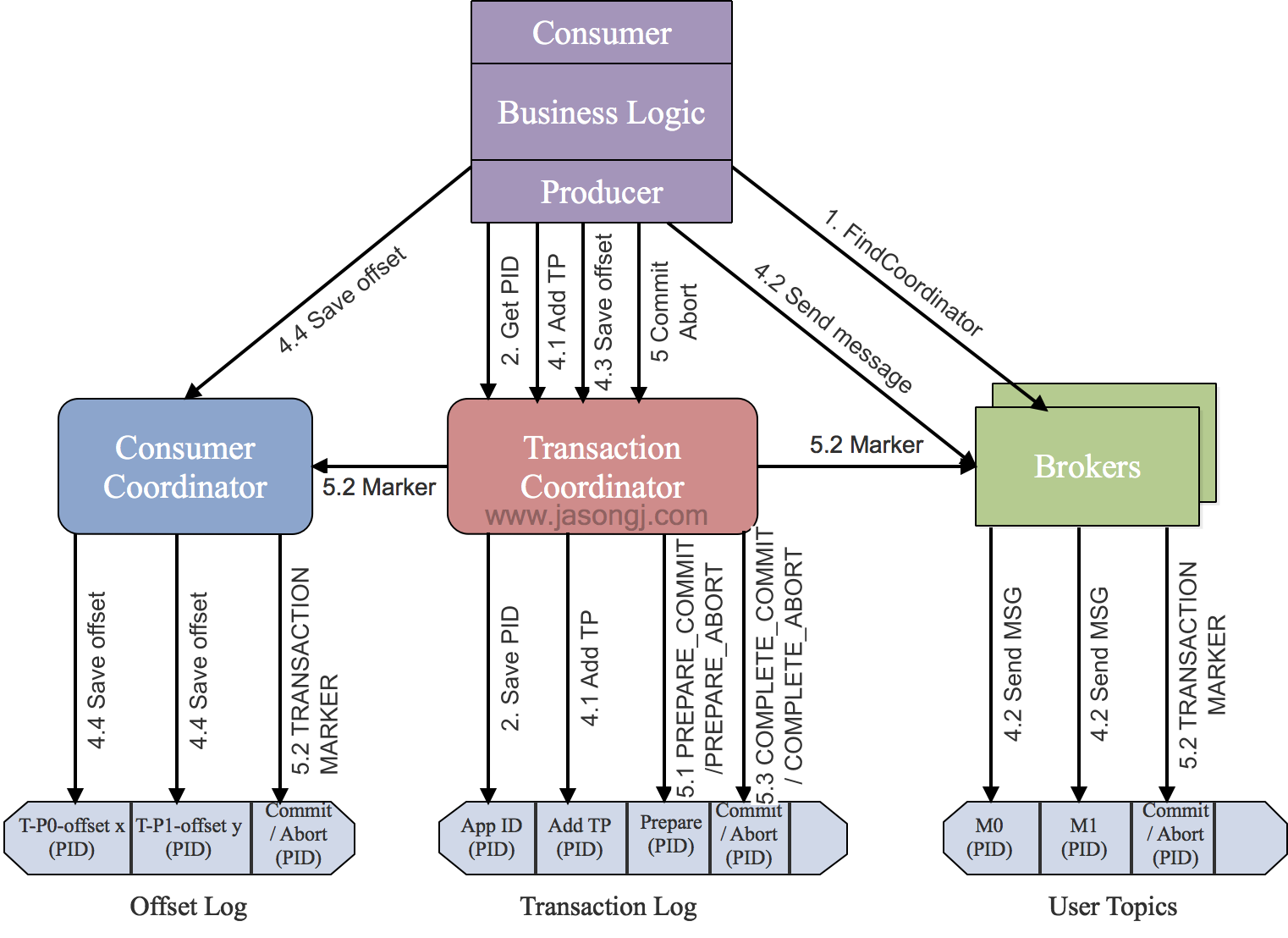
- Implementation
- step 1) find
Tranaction Corordinator (TC)- producer sends
FindCoordinatorRequestto a broker, then finds a TC, and gets its node_id, host, port
- producer sends
- step 2) init initTransaction
initTransactions()sends anInitProducerIdRequestto the TC, which returns the PID and a bumped producer epoch, and records<transactional.id, PID, epoch, state>in the transaction log (states:Empty/Ongoing/PrepareCommit/PrepareAbort/CompleteCommit/CompleteAbort/Dead). This happensonce, before any send— it both fences the previous instance and resolves whatever it left open- Commit/Abort non-completed tasks
- add PIC with epoch, make transaction in producer
- step 3) begin Transaction
beginTransaction()marks the transaction as started in the producer’s local state only — the TC learns of it lazily, from the firstAddPartitionsToTxnRequestwhen a record is actually sent to a partition.
- step 4) read-process-write
- Once producer start sending event, TC will save
<Transaction, Topic, Partition>to Transaction Log, and set it “start” state, also record the time. - Broker will save sent event in its disk (without commit/abort). If there is an “abort”, msg on broker will NOT be canceled, but changed state to “abort”
- Once producer start sending event, TC will save
- step 5) commitTransaction/abortTransaction
- while producer run commit/abort, TC will do 2 phase commit
- phase 1 : modify Transaction log to
PREPARE_COMMITorPREPARE_ABORT - phase 2 : modify all events written by Transaction Marker to committed or aborted
- phase 1 : modify Transaction log to
- once Transaction Marker complete writing, TC will write final status to Transaction log and mark such transaction is completed
- while producer run commit/abort, TC will do 2 phase commit
- step 1) find
- pic
- Ref
9’) Explain Transaction Coordinator and it mechanism ?
Transaction Coordinator (TC)is a moduleinside a broker— the transactional counterpart of the group coordinator- Which broker :
hash(transactional.id) % partitions of __transaction_state— so one transactional producer always talks to the same TC, and the TC’s state survives failover because__transaction_stateis a replicated, compacted topic - What it owns
- the transaction log :
<transactional.id, PID, producer epoch, state, partitions involved, timeout> - states :
Empty -> Ongoing -> PrepareCommit / PrepareAbort -> CompleteCommit / CompleteAbort - writing
Transaction Markers (control batches)into every partition the transaction touched
- the transaction log :
- Mechanism =
two-phase commit(detail in 9 above): phase 1 writes PREPARE_* to the transaction log (the point of no return), phase 2 writes the markers to the data partitions, then the final state goes back to the log Zombie fencing:InitPidRequestbumps theproducer epoch, so an old producer instance that comes back from a GC pause is rejected — this is what makes “exactly once” hold across a producer restart- Reader side : a consumer with
isolation.level=read_committedskips records whose transaction is aborted or still open (it reads only up to theLSO, the last stable offset)
10) Explain AR(Assigned Replicas), ISR (In-sync replica), and OSR(Out-of-Sync Replicas)?
AR (Assigned Replicas): every replica assigned to the partition.AR = ISR + OSRISR (In-Sync Replicas): the replicas (leader included) that have caught up with the leader withinreplica.lag.time.max.ms(30s by default). Only an ISR member may be elected leader (unless unclean election is enabled), andacks=allmeans “acknowledged by all of the ISR”OSR (Out-of-Sync Replicas): replicas that have fallen behind — a slow disk, a network partition, or a broker restarting. They keep fetching and rejoin the ISR once caught up- Why it matters :
min.insync.replicascounts the ISR, so if too many replicas fall out, producers withacks=allstart failing withNotEnoughReplicas— the cluster chooses consistency over availability, by design HW (high watermark)= the smallest log-end offset across the ISR — i.e. the offset of thefirst record not yet fully replicated, so it isexclusive: consumers may read everything below it and never the offset itself. That is why an un-replicated record is invisible rather than lost-after-read- Ref
11) Describe kafka limitation ?
- auto scale : it’s hard to scale down if scale out first (modify partition data in topics)
- can have 2 kafka clusters, if one wants to scale up/down still. (Use the other service request first, avoid downtime)
- keep published event in
ordering in global
12) Explain why kafka can do high I/O ?
- ordering read/write
- zero copy
- split file
- batch transmit
- data compression
- Ref
13) Explain kafka topic partition strategy ?
- Range strategy
- RoundRobin strategy
- Ref
14) What’s if multiple consumers in same consumer group ?
-
Can multiple Kafka consumers read same message from the partition ?
-
Kafka consumers are typically part of a consumer group. When multiple consumers are subscribed to a topic and belong to the
same consumer group,each consumerin the group will receive messages from a differentsubsetof the partitions in the topic. -
如果ㄧ個consumer group 裡有複數個consumer -> 每個consumer只會收到topic
部分的訊息 -
如果consumer 分屬不同 consumer group (訂閱同個topic) -> 每個consumer都會收到topic
全部訊息 -
In same group : No
- Two consumers (Consumer 1, 2) within the same group (Group 1)
CAN NOTconsume the same message from partition (Partition 0)
- Two consumers (Consumer 1, 2) within the same group (Group 1)
-
In different group : Yes
- Two consumers in two groups (Consumer 1 from Group 1, Consumer 1 from Group 2) CAN consume the same message from partition (Partition 0).
15) streaming model ?
-
Msg queue (e.g. rebbitMQ)
- each serve can only read part of msg fro queue
-
pub - sub (e.g. publish, subscriber)
Note : In kafka, the concept of “consumer group” offers the generic of mix above
- multiple consumers in same group ~= reading from queue